symptoms
Why is my microwave running but not heating?
A microwave that runs but does not heat has a fault in its high-voltage circuit or door switches, or a setting such as demo mode. What you can safely check, why you must never open the cabinet, and what a repair costs.
By Appliance Guardian · Updated · 5 min read
A microwave that lights up, turns and hums but does not heat usually has a failed part in its high-voltage circuit: the magnetron, the high-voltage diode, the high-voltage capacitor or the transformer. A failed door interlock switch or a blown fuse is the other common cause. Before any of that, rule out a setting such as demo mode or the kitchen timer. Those settings, the door and the power are the only safe homeowner checks. Never open a microwave’s cabinet. It holds a charge that can kill, even when unplugged.
Is it safe to open a microwave to check it?
No. A microwave contains a high-voltage capacitor that can hold a dangerous charge long after the oven is unplugged. GE is blunt about this: it offers no do-it-yourself repair advice on microwave ovens for safety reasons, warns that the internal capacitor can hold a high-voltage charge even after the microwave has been unplugged, and notes that special equipment is generally needed to diagnose it.
Health Canada’s microwave oven guidance adds three rules that apply here:
- Hire qualified service technicians for all adjustments and repairs.
- Do not use the oven if the door does not close, or is bent, warped or damaged in any way.
- Do not disable or tamper with the oven’s safety interlocks.
Unplugging a microwave does not make the inside safe. Keep the cover on.
Why is my microwave running but not heating?
A microwave makes heat by feeding very high voltage from the transformer, through the diode and capacitor, to the magnetron, which produces the microwaves. The door interlock switches only allow that circuit to run when the door is fully shut. A failure anywhere along that chain leaves the light, turntable and fan working with no heat. Samsung and GE both point to simpler causes first:
- Demo mode. Samsung explains that in demo mode every function works but nothing heats. It is used on showroom floors.
- Kitchen timer. The timer function counts down without cooking.
- Door not fully shut. Samsung notes a microwave may run but not heat if the door is not completely closed.
- Blocked ventilation. Samsung says a microwave without enough clearance cannot vent properly and may not heat, or heat weakly.
After those come the parts: the magnetron, diode, capacitor and transformer, the door interlock switches, a thermal cut-out, a blown internal fuse, and the control board.
| What you notice | Likely cause | Safe to check yourself? |
|---|---|---|
| ”Demo” or “D” on the display, or it counts but nothing warms | Demo mode or timer | Yes, from the controls |
| Heats only if you press the door hard | Door latch or interlock switch | No, call a technician |
| Runs normally, cup of water stays cold | Magnetron, diode, capacitor | No, call a technician |
| Loud buzzing or humming, then no heat | High-voltage circuit fault | No, stop using it |
| Sparks, burning smell, or a damaged door | Arcing or door damage | No, stop using it |
What can I safely check before calling?
These are the only checks we suggest. None involve opening anything.
- Check for demo mode. Look for “Demo” or a “D” on the display. Your manual shows the button sequence to turn it off.
- Make sure you pressed Start on a cooking cycle, not the kitchen timer, and that the power level is not set low.
- Open the door and close it firmly, as GE suggests. Check the door, hinges and latch for damage. If the door is bent, warped or does not close, stop using the microwave.
- Check the clearance. Countertop models need the air space your manual gives around the vents. Don’t box one into a cupboard.
- Reset the power. Unplug it for a minute, or switch off the breaker for an over-the-range model, then restore power.
- Test with water. Heat a microwave-safe cup of water on full power for one minute. If it is still cold, the microwave is not heating.
When should I leave it to a technician?
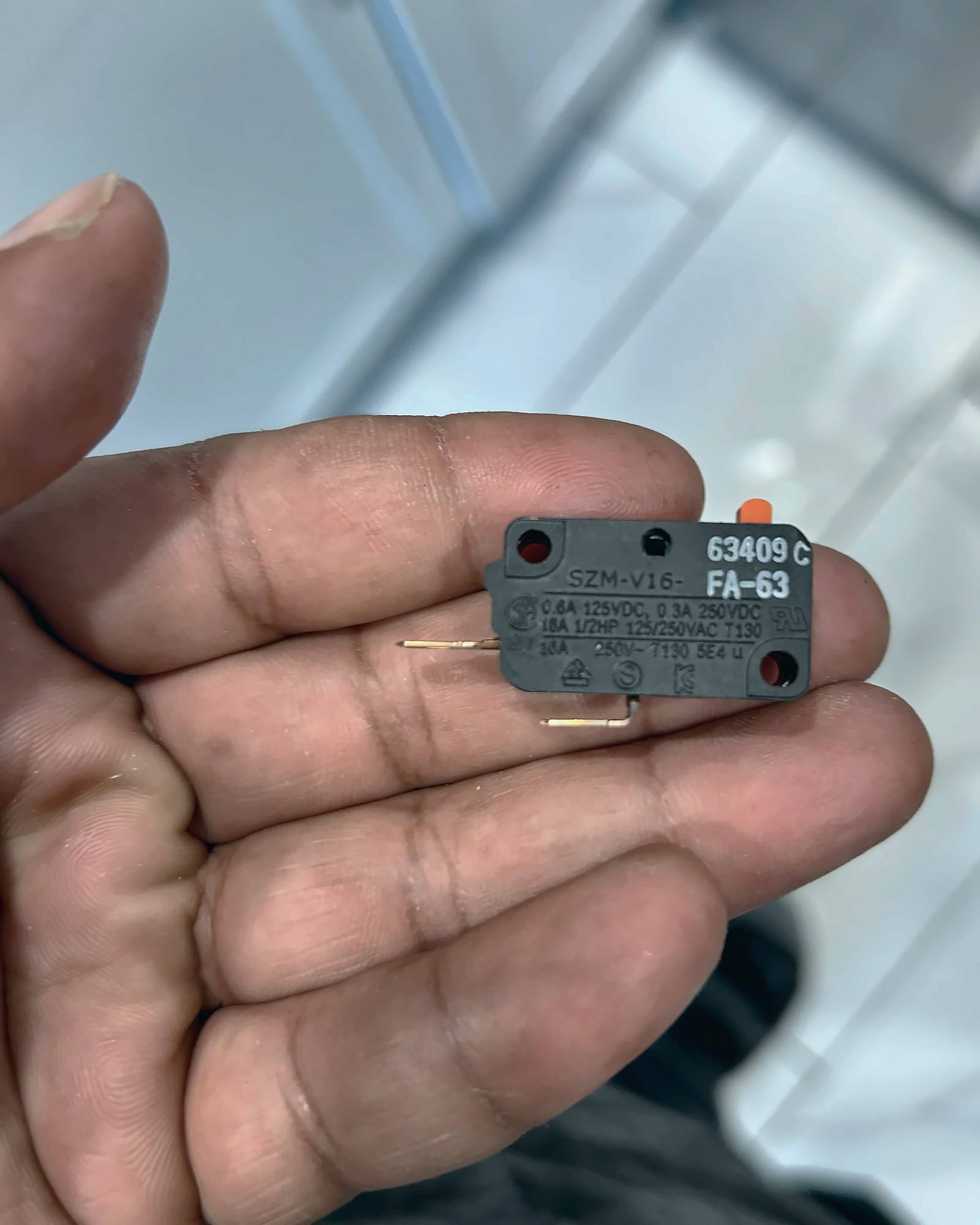
Everything inside the cabinet. That includes the magnetron, diode, capacitor, transformer, door interlock switches, fuses, thermal cut-outs and control board. The door interlock switches are also safety parts. Health Canada is clear that they must not be tampered with. The photo above shows one of these switches. Parts like this are only handled with the capacitor safely discharged, by a technician trained to do it.
What does a technician test?
A technician first confirms the fault from outside, then unplugs the microwave and discharges the high-voltage capacitor before opening it. The door interlock switches are tested for correct switching, since a failed monitor switch often blows the main fuse. The high-voltage parts are checked with the meters and methods the maker’s service data specify. Once the microwave is back together, it is tested for heating and the door is checked for a proper seal.
How much does it cost to fix in Toronto?
Microwave repairs are estimated at $150–$300 including parts and labour, plus HST. That is a planning range, not a diagnosis. The diagnostic visit is $89 + HST, waived when you go ahead with the quoted repair, and you get the quote before any repair starts. See microwave repair for the brands we service.
Repair or replace?
Whether a repair is worthwhile depends on the model. Replacing a basic countertop microwave is often better value than repairing it. An over-the-range or built-in microwave costs more to replace and install, so a repair is more often worth it. The diagnosis tells you which side of that line your microwave falls on.
When should I stop using it?
- Stop right away if you see sparks or arcing, smell burning, or hear loud buzzing.
- Stop if the door does not close properly, or the door, hinges, latch or seal is damaged. That is Health Canada’s advice.
- Stop if it runs with the door open, or keeps running after the door opens. Unplug it, or switch off its breaker, and call.